Clay's Blog

These are the official blogs about CalemEAM.
Nov
12

New Feature: Fixed Asset and ERP Integration


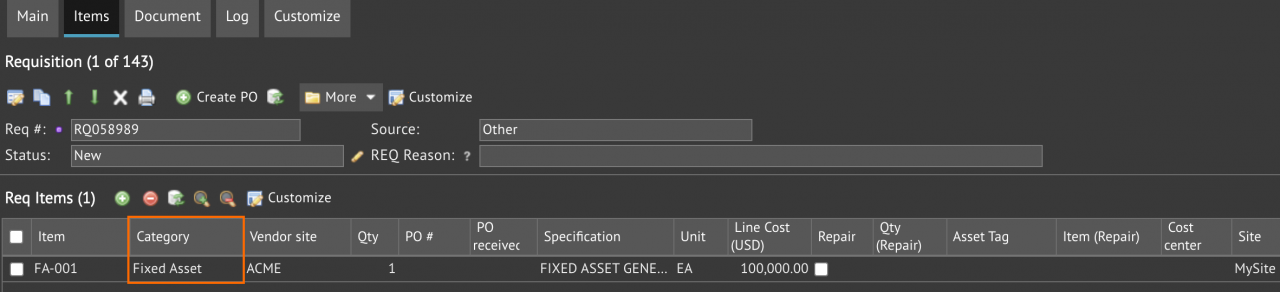
Fixed asset is a new category of items in Calem R2026h (November 2026). It is used in purchasing fixed assets.  A fixed asset item is like a service. It can be ordered, received and issue to assets. A REQ may be created for fixed assets. Only items of fixed asset can be placed in a REQ of fixed assets.Menu path: Requisition | Create Fixed...
Continue reading
  41 Hits
Tags:
41 Hits
Nov
11

Calem AI - Part 6: Private AI for Your Maintenance Data


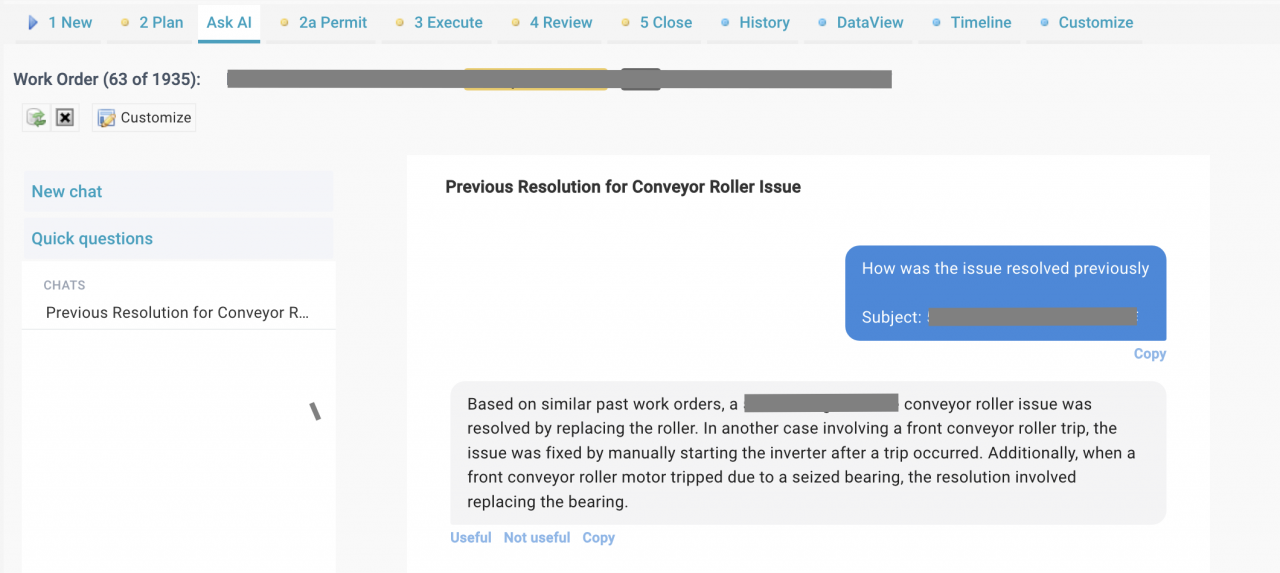
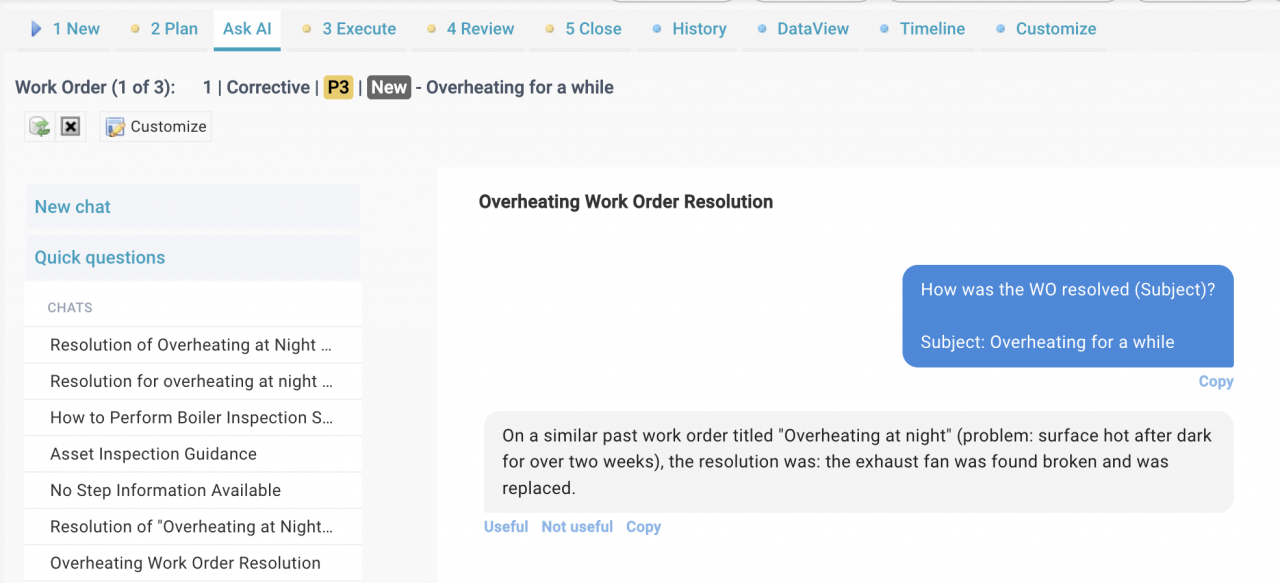
A technician can ask questions like "How was this issue resolved before?" in a work order and get an answer drawn from your own past work orders and equipment documents (screenshot below). The Ask AI feature in Calem uses a language model (LLM). There are potential issues with the use of public AI services.  Maintenance rec...
Continue reading
  74 Hits
74 Hits
Nov
09

New Feature: Permit Approval by Department


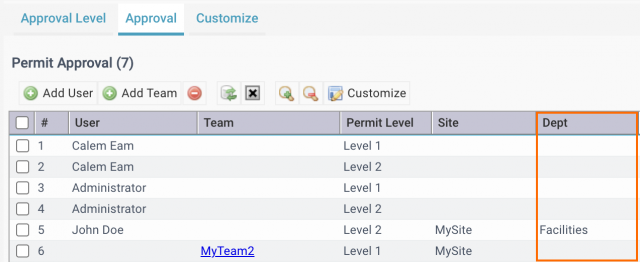
Permit approval by department is available in the coming release of R2026h for November 2026. Permit approvals may be granted to users and teams by levels and departments. Menu: Organization | ACL Profiles | PermitSetting | Permit ApprovalA combination of user or team can be assigned anapproval level by department, by site, or all departments and a...
Continue reading
  116 Hits
Tags:
116 Hits
Nov
01

Using Meters as Asset Run Time for MTBF and OEE

Download PDF File Here      Additional Resources Part 1: Transform Calem Data into KPIs with Power BIPart II: Get Data from Calem from Power BIIntroducing the New Reporting Module in CalemMaking a Shared Search RequiredHow to Use the Calendar View for Work OrdersHow to Set Up Map Views in CalemHow to Visualize Work Orders by Open WO ...
Continue reading
  316 Hits
316 Hits
Oct
31

Part 2: Get Data from Calem in Power BI


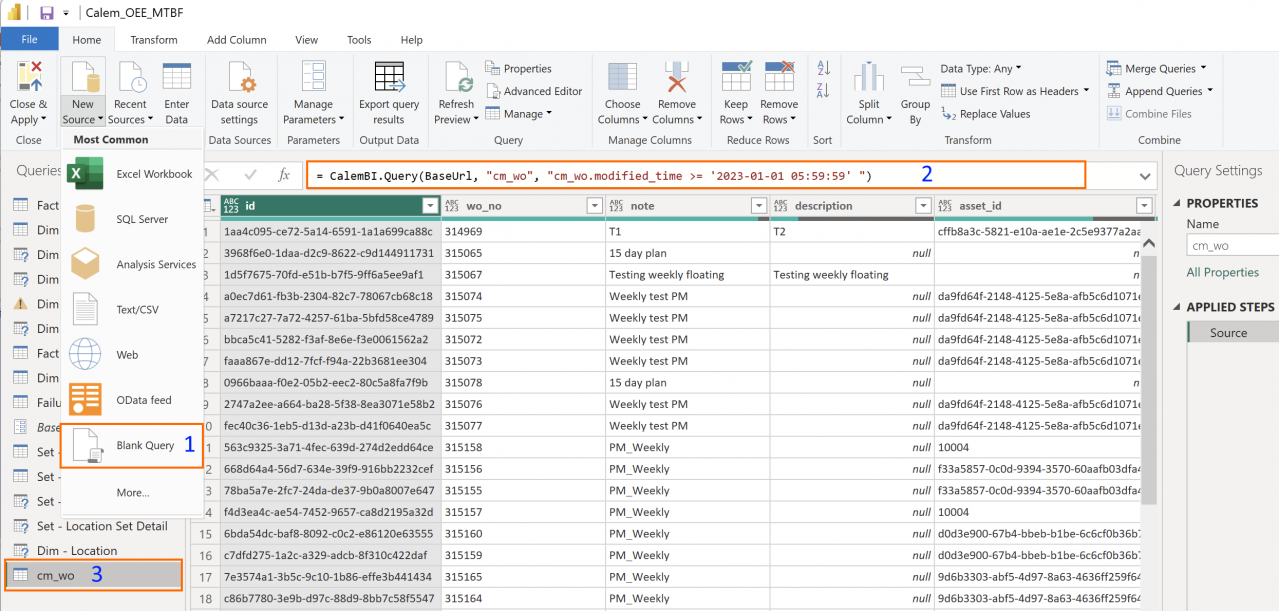
Calem connector for Power BI enables fetching any table or view from Calem in R2026h (November 2026) so clients can create own dashboards. Work orders (cm_wo) are fetched from Calem to Power BI in the screenshot below.   Here are the steps to add data from Calem in Power BI Desktop. Go to Home | Transform dat...
Continue reading
  316 Hits
Tags:
316 Hits
Oct
29

Admin Tip: Color-Coding Dropdown Fields in Calem


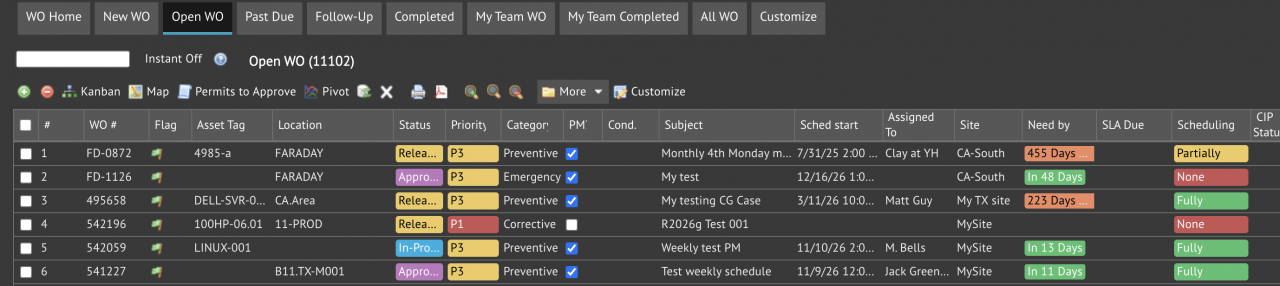
Color-coding dropdown fields can be implemented through client config changes at client/conf/CmConf.custom.js. The screenshot below shows a work order list with color-coded fields in Calem. In addition to color-coded fields out of the box, admin can add color-coded fields through config changes. The first step is to enable ...
Continue reading
  377 Hits
377 Hits
Oct
26

Feature Tip: Set Up PM Meters by Upload


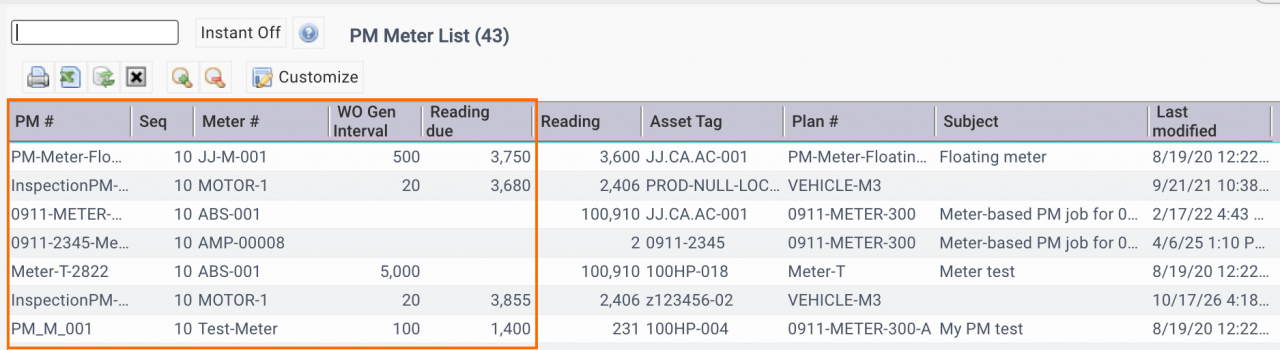
PM Meter Lis report is available in the coming release R2026g (October 2026). The report may be exported to get an excel template for uploading PM meters. Menu path: PM | Report | PM Meter ListExport the list to Excel, keep the columns highlighted and delete other columns.You may modify the data in the list report and upload to Calem for data updat...
Continue reading
  446 Hits
Tags:
PM
446 Hits
Oct
26

Standardize Item Specifications with Attributes


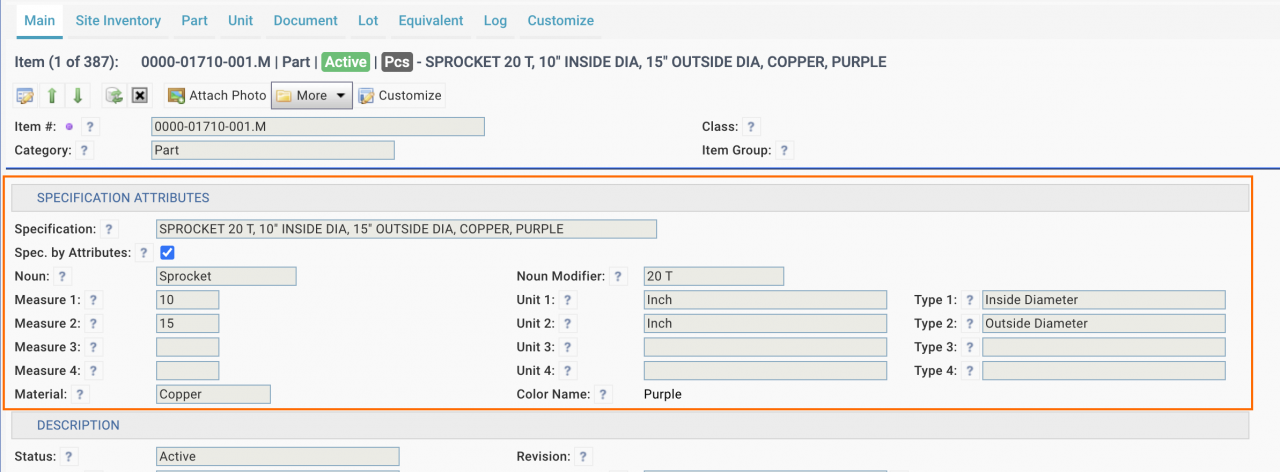
Attribute-based templates are introduced in release R2026g (October 2026). They can be used to create consistent part specifications (screenshot below) for better management of inventory across business units of an organization. The feature may be checked (Spec. by Attributes) per item to generate specification from attributes. If no...
Continue reading
  449 Hits
Tags:
449 Hits
Oct
25

New Monthly Asset KPIs: MTBF and MTTR


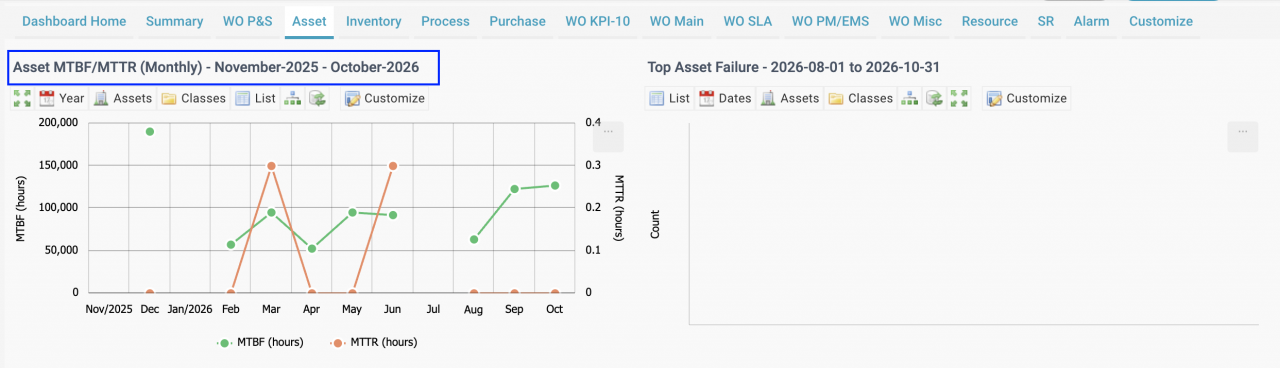
New Monthly MTBF/MTTR KPIs are available in Calem R2026g (October 2026). They are based on the monthly KPIs calculated for the MTBF/MTTR Dashboard for PowerBI integration (screenshot below). Monthly MTBF and MTTR KPIs are shown for the past 12 months. Use "Assets" filter to drill down to the KPIs for a single asset. Go to i...
Continue reading
  554 Hits
Tags:
554 Hits
Oct
25

Feature Tip: Performance KPIs for Technicians


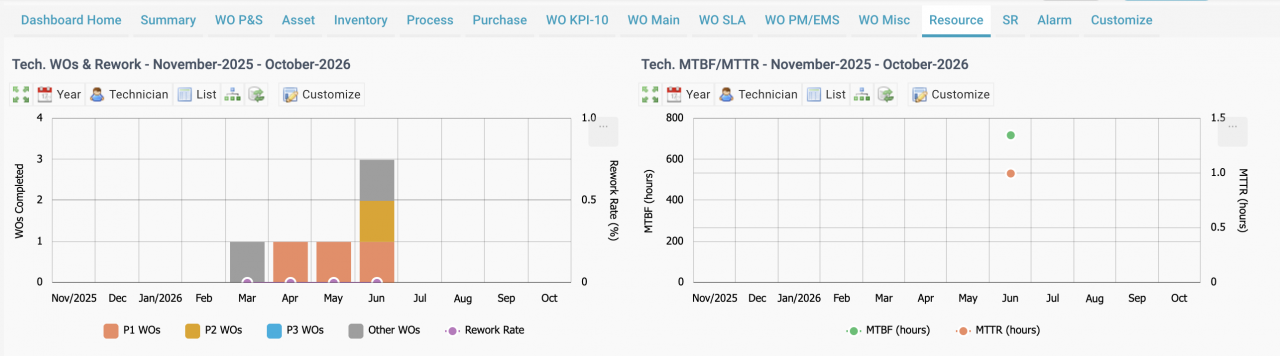
Monthly performance KPIs for technicians are available in the coming release of Calem R2026g (October 2026). The KPIs are based on work orders and asset performance. The main use case is to view the KPIs by selecting a technician (the "Technician" menu in the screenshot below). Work orders completed by techs are grouped by asset prioritie...
Continue reading
  484 Hits
Tags:
484 Hits
Oct
23

Feature Tip: Work Permit Life Cycle Control


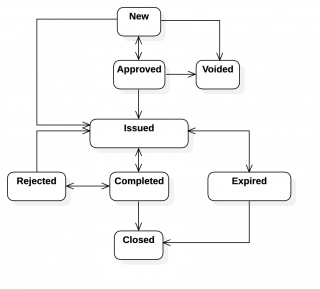
Permit life cycle has been refactored in release R2026g (October 2026). The following roles are defined for permit life cycle control. The status diagram of permit life cycle is show below. Permit Approvers who are the issuers of permits. They review and approve permits.Permit Receivers who receive permits. They ack the receipt of permits...
Continue reading
  603 Hits
Tags:
603 Hits
Oct
21

Feature Tip: Reporting Time in Service Requests


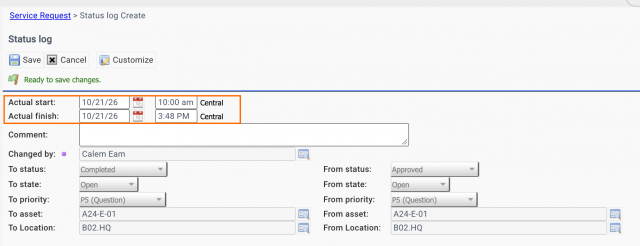
Actual start and finish time can be filled out in SR in the coming release of R2026g. When completing a service request a user may fill out the actual start and end time (screenshot below).  Additionally, a technician may report hours spent in an SR from the "Labor" tab:            Additional Resources WO/SR ...
Continue reading
  486 Hits
486 Hits
Oct
17

Feature Tip: Work Permit Enhancements


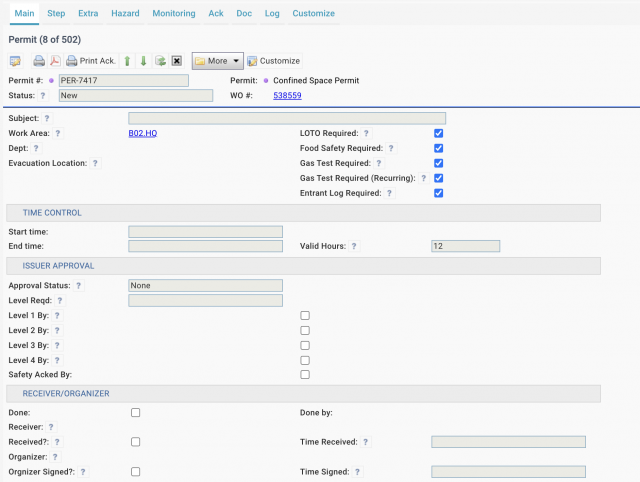
Enhancements to work permits are available in the coming release of R2026g in October 2026. For example, a confined space permit (screenshot below) involves LOTO, food safety, atmospheric monitoring (Gas Test) and entrant control. A general safe permit (screenshot below), including hazards and PPE requirements, goes with th...
Continue reading
  597 Hits
Tags:
597 Hits
Sep
16

Calem AI - Part 5: WO Assistant - Ask AI


WO Assistant (Ask AI) is available in the coming release of R2026f in September 2026. The feature enables a user to troubleshoot a WO by asking "How was the WO resolved?" (screenshot below). A user may also ask for instructions to perform a PM step. 1. Quick Questions Frequently asked questions may be defined so users can ask qu...
Continue reading
  1118 Hits
1118 Hits
Aug
28

Calem AI - Part 4: Duplicate Work Order Detection


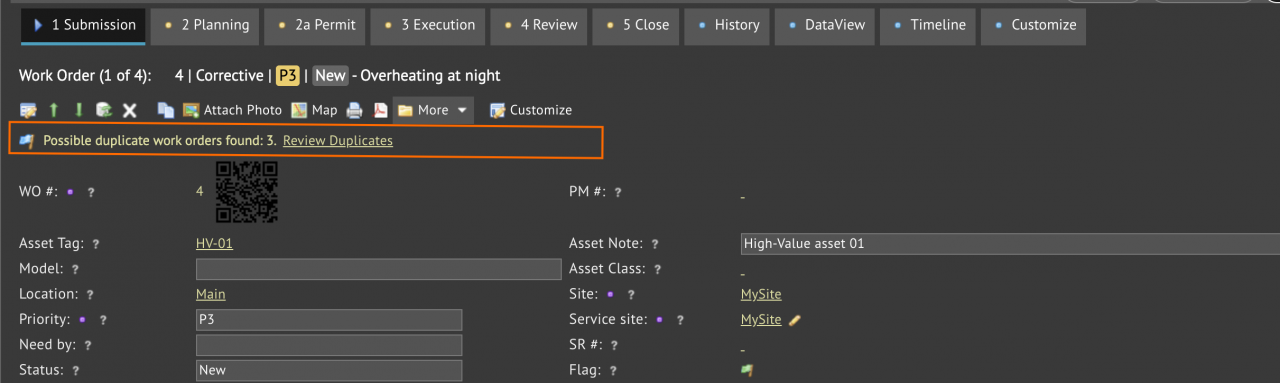
A new AI-assisted feature to detect duplicate work orders is available in the coming R2026f release (September 2026). It uses AI language models to compare subjects and problem descriptions of work orders to determine potential duplicates. AI language models can look beyond individual words and evaluate the meaning and context of the work orde...
Continue reading
  1267 Hits
1267 Hits
Aug
07

Enhancing Incident Print: Dynamic Layouts & Attachments


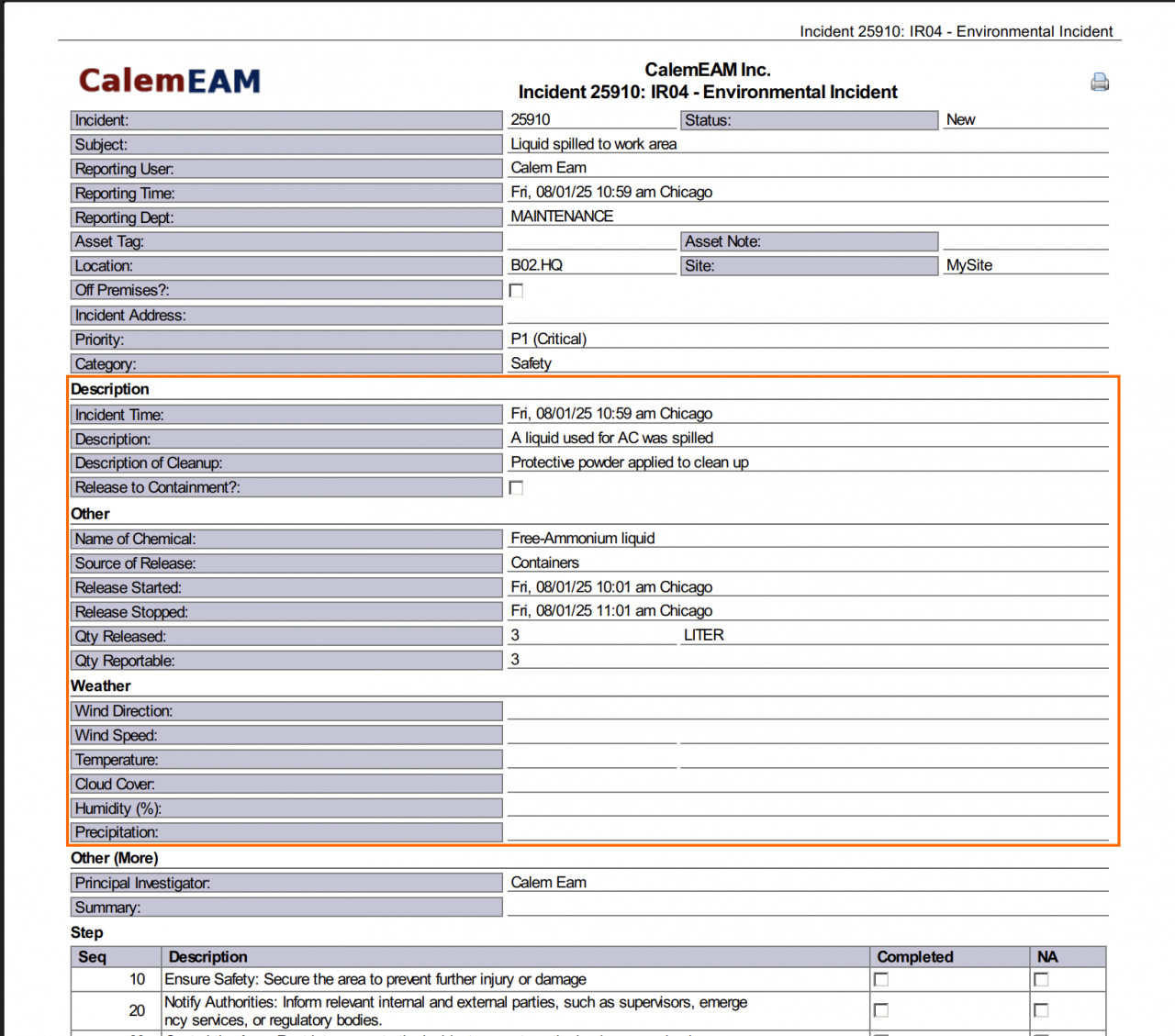
Enhancements are made in incident print in the coming release of R2026e. They include dynamic layouts and images/PDFs inlined (screenshot below). An incident print includes fields based on incident classes. For instance, weather info is included for environmental incidents.PDF docs of an incident are included in its print.Images and ...
Continue reading
  1680 Hits
Tags:
1680 Hits
Aug
05

Steps to Remove Work Permits in Calem


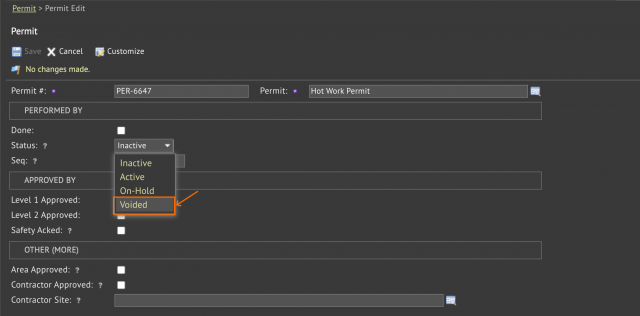
A permit deletion process is added in the coming release of R2026e. There are cases that a permit added turns out to be incorrect later. Here are the steps to delete a permit: A new status "Voided" is added to make a permit voided. Only users with level 1 or level 2 permission for a permit can change its permit status to "Voided...
Continue reading
  1736 Hits
Tags:
1736 Hits
Aug
02

Merging Duplicate Users in Calem


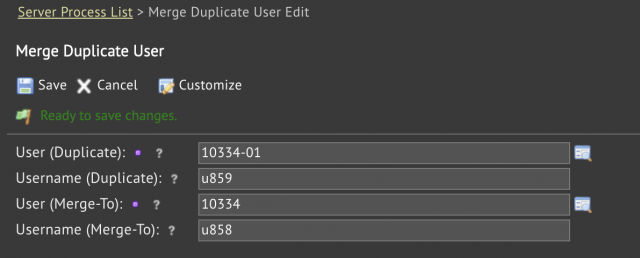
A process to merge duplicate users is available in the coming release of R2026e. It allows admin users to merge duplicate users into valid users.  Menu: Admin | Open | Server Processes | Merge Duplicate userSelect a duplicate user and the user to be merged intoClick "Save" to complete the merging process.The status of duplicate user is se...
Continue reading
  1742 Hits
1742 Hits
Aug
01

Introducing Item Sets in Calem


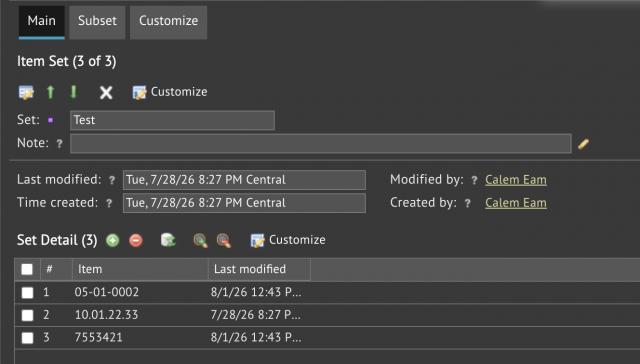
Item sets will be available in the coming R2026e release. An item set consists of item codes and other item sets. Items can be tracked and analyzed easily by item sets in KPIs and list views. Menu: Dashboard | Open | Item Set (screenshot below). Use this menu to manage item sets.Dashboard | Purchase KPI - use item sets to analyze prices a...
Continue reading
  1740 Hits
Tags:
1740 Hits
Jul
20

Project Tip: Filtering Projects for Last Modified


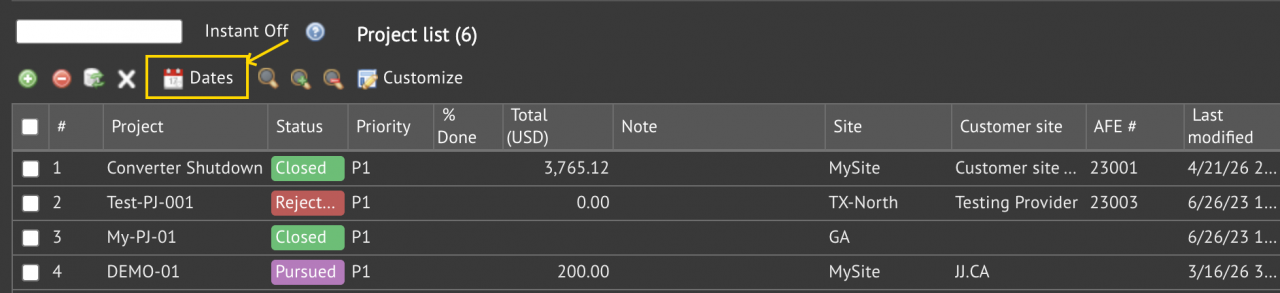
Project filtering by "Last modified" is available in the coming release of project and report.  It is the "Dates" menu in project list and report (Project | Report | Project List).Select a date range, or populate a custom range, click "Save" to apply filtering.To remove date range filtering, click "Search Clear".Additional filtering (such...
Continue reading
  1955 Hits
Tags:
1955 Hits