Calem Blogs
Blogs of CalemEAM
Purchase KPI B: Top Vendors by Spend
New purchase performance KPIs are available in the coming release R2026 (February 2026). They surface top vendors by spend so that outliers can be easily spotted. The metrics are calculated for all vendors so one can export the metrics for further analysis.
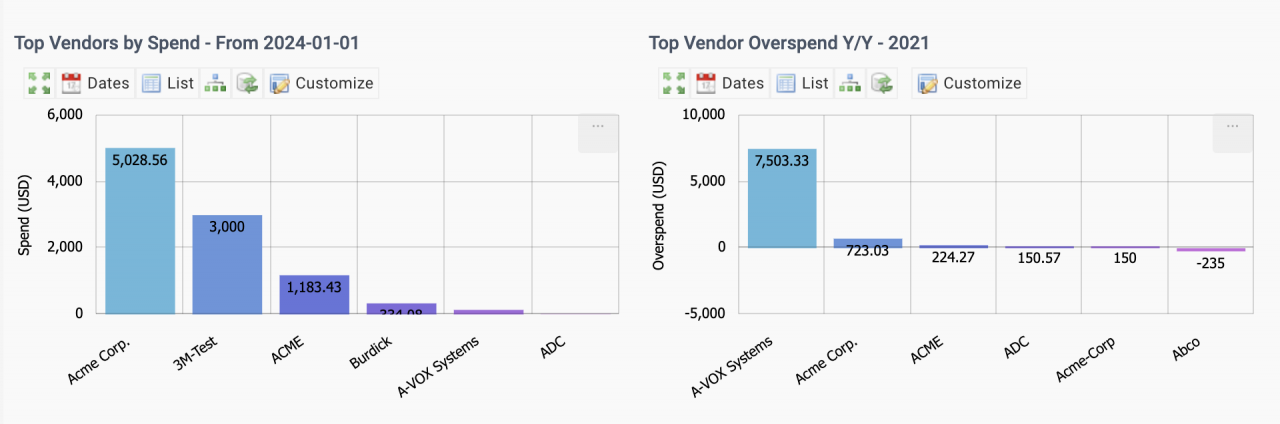
1. Top Vendors by Spend
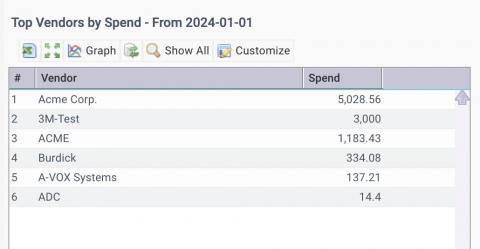
Top vendors by spend are calculated from purchase orders (PO). A reporting period can be defined by "Dates" menu (in screenshot above).
- Top 10 vendors are shown in the KPI bar chart.
- They can also be presented as list view ("List" menu above) for export.
- "Show All" menu in the List view shows all vendors with total spend in the reporting period.
- You may export the data to excel for further analysis.
- Click a vendor row in the list to drill down to POs.
- Multi-Site drill-down is available - see this blog for an introduction of multi-site drill-down.
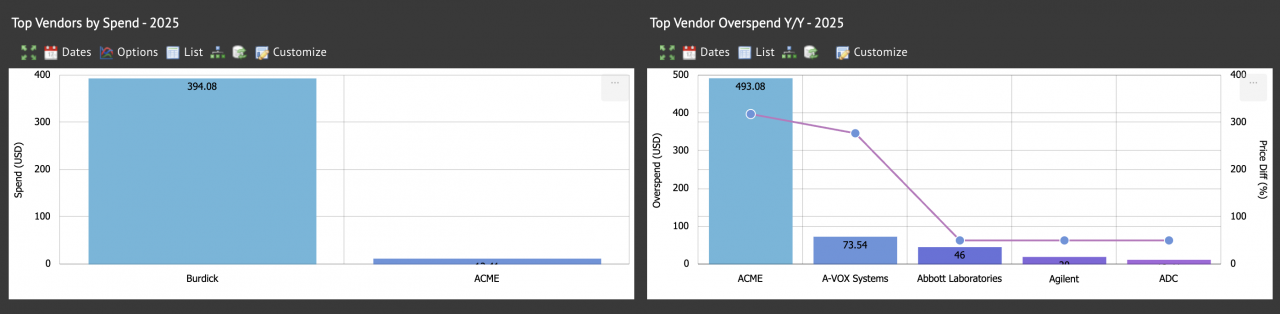
2. To Vendor Overspend Y/Y
This KPI shows the increase of total spend per vendor of current year versus last year.
- Top 10 vendors are shown with the highest overspend.
- Average price changes (%) by vendors are shown in the KPI.
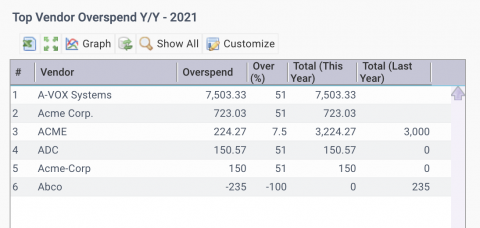
- List view shows total expenditure of current and previous year per item.
- Positive overspend are increases from last year, and negative reductions.
- Click an vendor row to drill down to POs.
- A percentage of 51 is used for a vendor without spend last year.
- Show All menu will list all vendors with overspend information. Exporting the data to excel for further analysis.
- Multi-Site drill-down is available - see this blog for an introduction of multi-site drill-down.
KPI Resources
- Purchase KPI A: Item Price and Overspend
- Multi-Site KPIs for Inventory
- Multi-Site KPIs for Maintenance
- Bulk Update by Export and Upload
- Instance Dashboard and Home Pages
- Part Repair Processes in Calem
- How to Track Asset Off-Site Repairs
- How to Use Price Lot in Calem
- Work Order Life-Cycle Diagrams
- Asset Tracking in Calem
- User Guide and Admin Guide (customer account required)
- Calem Enterprise Training Site
- Calem Enterprise Blogs
- Calem Enterprise demo
About the author

By accepting you will be accessing a service provided by a third-party external to https://www.calemeam.com/