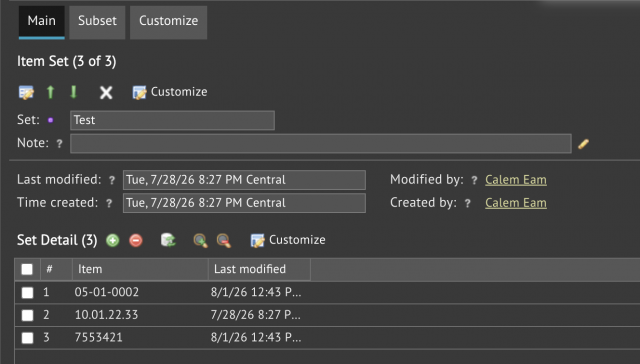
Item sets will be available in the coming R2026e release. An item set consists of item codes and other item sets. Items can be tracked and analyzed easily by item sets in KPIs and list views.
- Menu: Dashboard | Open | Item Set (screenshot below). Use this menu to manage item sets.
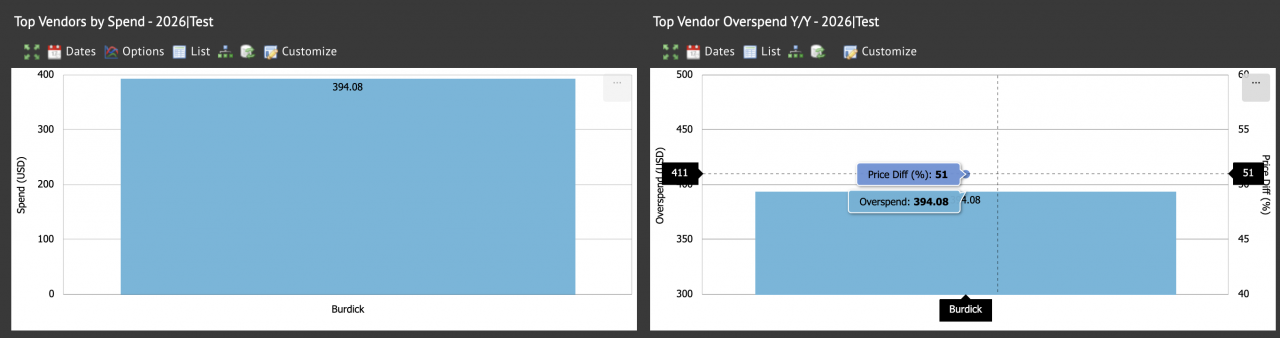
- Dashboard | Purchase KPI - use item sets to analyze prices and costs by vendors (screenshot below)
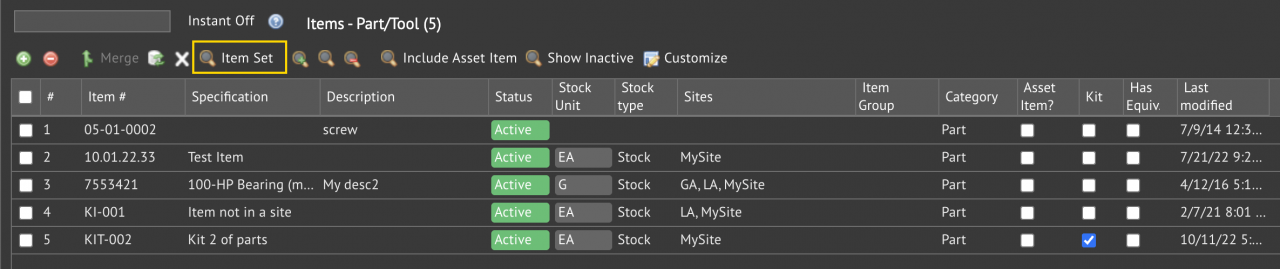
- Inventory | Items - Part|Tool (or Items - All) - use item set to narrow item lists (screenshot below)
- To remove item set filtering, click "Search Clear".
- Alternatively, click "Item Set" menu to clear the selection and save.
KPI Resources
- Purchase KPI A: Item Price and Overspend
- Multi-Site KPIs for Inventory
- Multi-Site KPIs for Maintenance
- Bulk Update by Export and Upload
- Instance Dashboard and Home Pages
- Part Repair Processes in Calem
- How to Track Asset Off-Site Repairs
- How to Use Price Lot in Calem
- Work Order Life-Cycle Diagrams
- Asset Tracking in Calem
- User Guide and Admin Guide (customer account required)
- Calem Enterprise Training Site
- Calem Enterprise Blogs
- Calem Enterprise demo