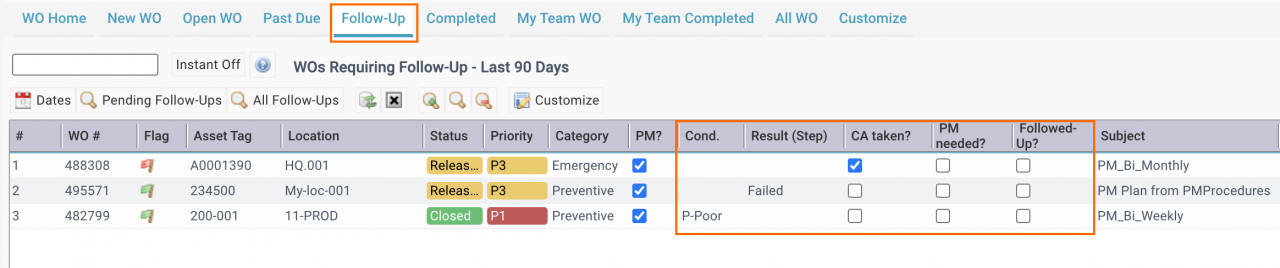
A new tab "Follow-up" is added in Work Order Home screen in release R2026 (Feb. 2026). The tab shows work orders to be followed up. A work order is to require a follow-up if one of its step is flagged:
- The status of a step is set to failed.
- The condition of a step is set to "Poor".
- A corrective action is taken (a checkbox) in a step.
- PM is needed (a checkbox) in a step.
The "Follow-Up" tab at Work Order Home screen is the central place to manage work orders requiring follow-ups.
- Use "Dates" to set date range to view work orders to follow-up.
- Click "Pending Follow-Ups" to view work orders that follow-ups have been been taken.
- Click "All Follow-Ups" to view all work orders with follow-ups.
- When a follow-up work order is created for a work order the checkbox "Followed-Up" is set by Calem.
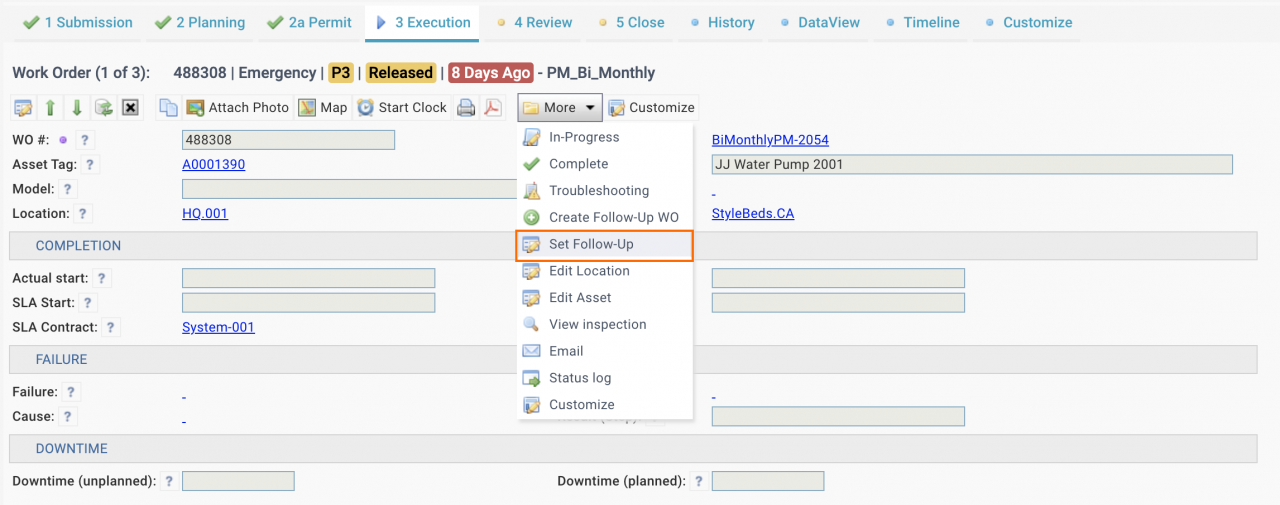
- Menu: Work Order form | More | Create Follow-Up Work Order.
- One can manually set the checkbox without a follow-up work order.
- Menu: Work Order Form | More | Set Follow-Up
Additional Resources