Calem Blogs
Calem AI - Part 7: AI Min/Max for Spare Parts
Planned for the coming release of R2026i (December 2026), Calem's AI min/max sets each part's reorder point (min) and order-up-to level (max) from that part's own last 2 years of usage and delivery times. For every part it tries five forecasting methods by replaying the last year day by day, and keeps the least stock one that would have met the part's service level.
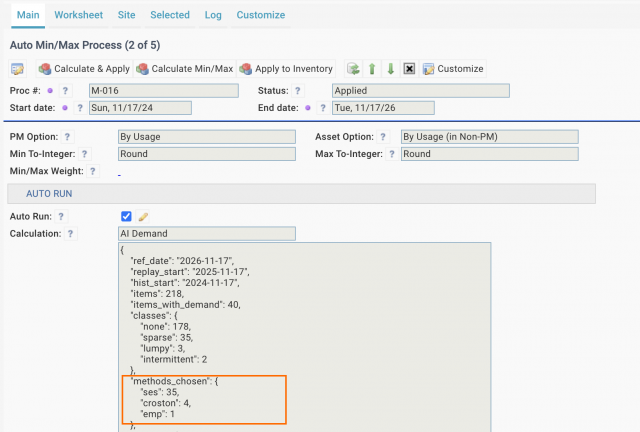
- For instance, the AI Min/Max selected three forecasting methods (ses, croston and emp - to be explained later) based on part history (screenshot below).
1. Forecasting Part Demand
No single method is best for every part, so the methods compete for each part in a replay of its own history.
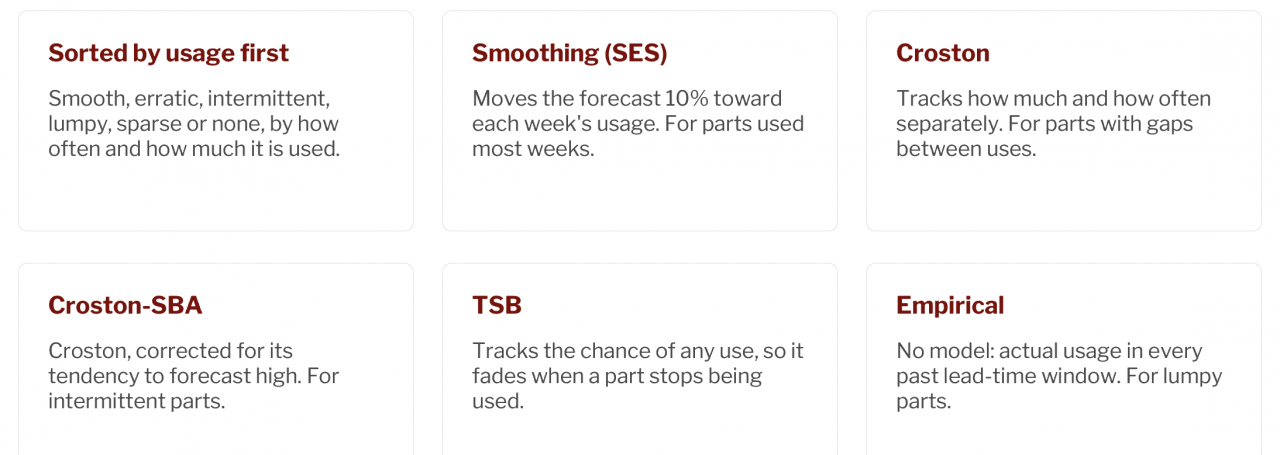
2. Picking a Method by Usage History
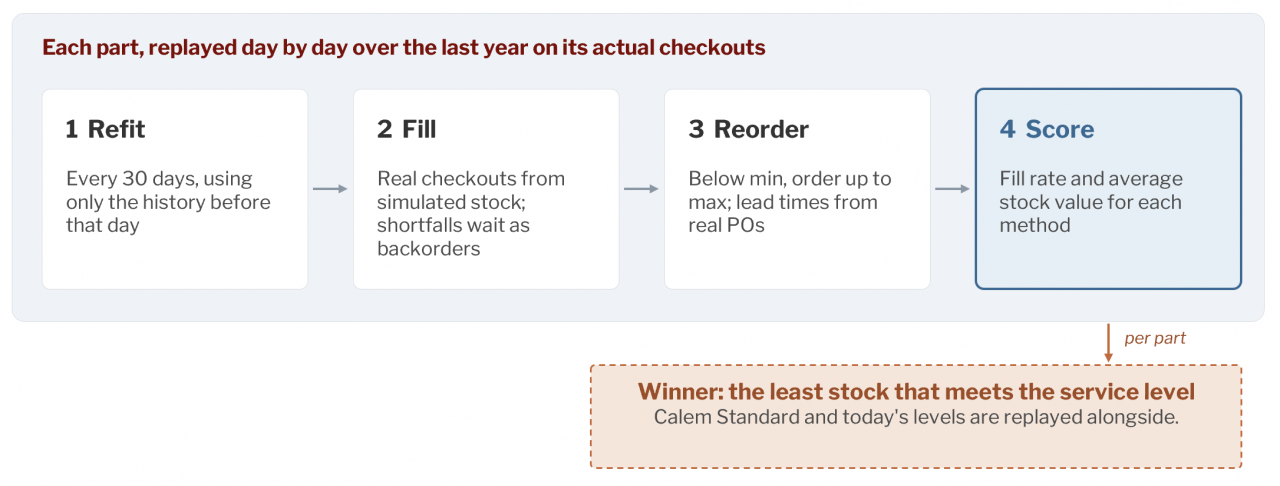
A method is selected for each part by replaying the past.
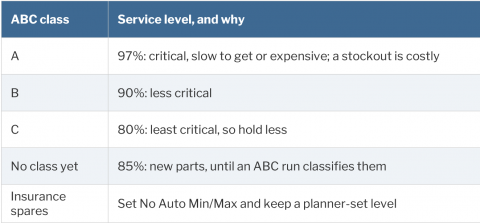
3. Service Levels by ABC Class
A service level is the chance of not running out during a reorder cycle, from placing an order until it arrives. Service levels are based on part criticality, i.e., ABC class.
- To keep the AI Min/Max and ABC class up to date and in sync, Auto ABC processes are invoked to refresh ABC class when needed by AI Auto Min/Max processes.
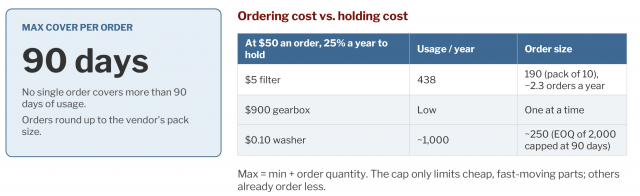
4. Order Quantity by EOQ, Capped at 90 Days
Order quantity balances the cost of ordering often against the cost of holding stock: the economic order quantity (EOQ). It is then capped at 90 days of use, made at least one pack, and rounded up to whole packs per vendor's pack size.
- PM use is planned, so it is added to Min from the PM schedule rather than forecast. It is calculated two ways: from the PM forecast for the final Min, and from actual history in the replay.
5. AI Auto Min/Max and Auto ABC Processes
Setting up Auto Min/Max and Auto ABC processes to automate ABC and Min/Max updates so parts can be ordered with up to date Min/Max levels.
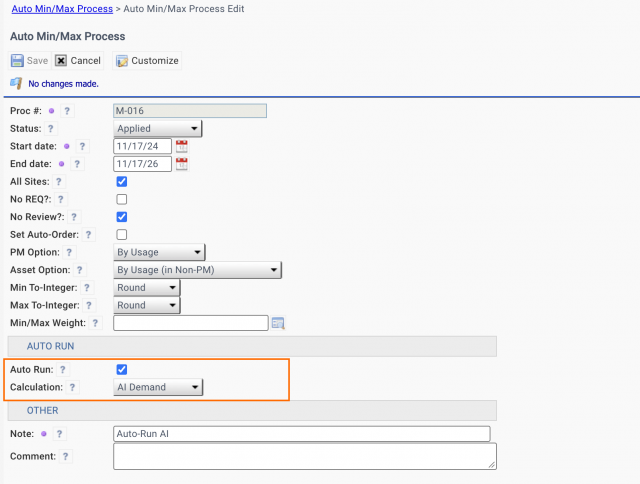
- For Auto AI Min/Max process, create a process (Admin | Open | Auto Min/Max Processes).
- Check "Auto Run"
- Select "AI Demand" for "Calculation"
- Start date and End date are not used for auto-run processes. Instead, part history of the past two years are used by the execution date.
- A sample Auto Min/Max process is shown in the screenshot below.
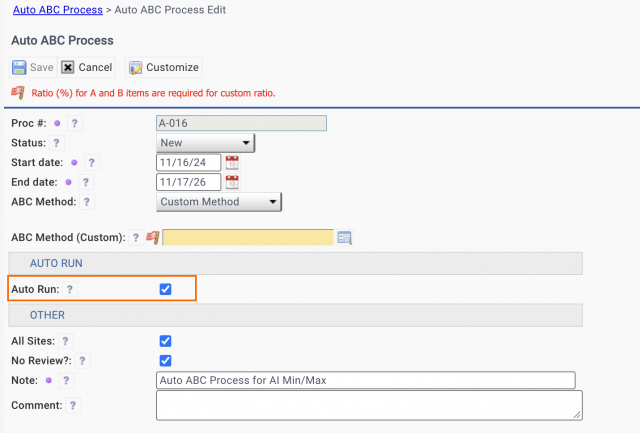
- For Auto ABC process, create a process (Admin | Open | Auto ABC Process).
- Configure the process accordingly.
- Check "Auto Run".
- Start date and End date are not used for auto-run processes. Instead, part history of the past two years are used by the execution date to be in sync with Auto Min/Max processes.
- A sample process is shown in the screenshot below.
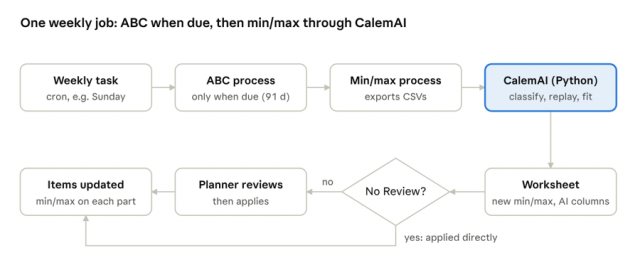
- Auto ABC process will be executed every 90 days. It does not need to be updated weekly.
6. AI Auto Min/Max Weekly
One scheduled job does everything, usually weekly on Sunday night: ABC first when it is due, then every min/max process with Auto Run checked.
Additional Resources
- Calem AI - Part 6: Private AI for Your Maintenance Data
- Calem AI - Part 5: WO Assistant - Ask AI
- Calem AI - Part 4: Duplicate Work Order Detection
- Calem AI - Part 3: Part Search by Pictures
- Calem AI - Part 2: Implementing Asset Failure Prediction (AFP)
- Calem AI - Part 1: Predicting When Assets Will Fail
- How to Setup Failure Tree for Troubleshooting
- Surfacing Step Conditions in Work Orders
- Asset Lifespan Alerts
- Asset Timeline View
- User Guide and Admin Guide (customer account required)
- Calem Enterprise Training Site
- Calem Enterprise Blogs
- Calem Enterprise demo
About the author

Related Posts
By accepting you will be accessing a service provided by a third-party external to https://www.calemeam.com/