Calem Blogs
Blogs of CalemEAM
Calem AI - Part 3: Part Search by Pictures
Part search by picture is enabled by powerful AI computer vision models such as DINOv2 by Meta AI. Here are the steps to perform a part search by picture in Calem.
- Menu path: Inventory | Open | Item by Picture
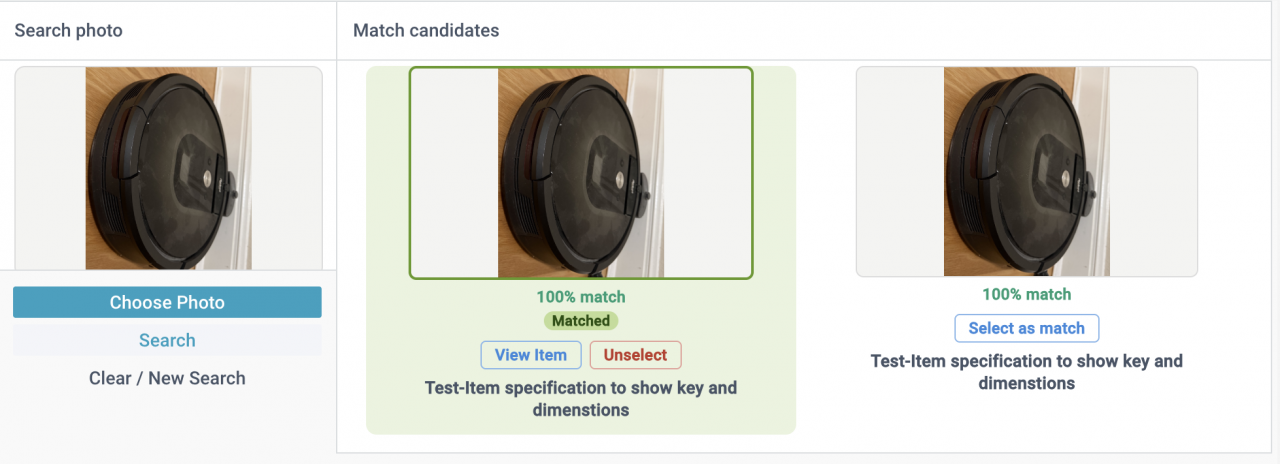
- A user takes a photo of a part and uses it in part search (screenshot below).
- The input photo is compared against all the photos in Calem item catalog based on AI computer vision models.
- Top candidate photos matching the input one is listed for review.
- User selects a photo to confirm a match. The input photo will be added to the matched item for future search.
Each photo (an input photo and photos in Calem item catalog) is transformed by the same AI computer vision model (DINOv2 is used in Calem) to derive a signature. The signatures are used for similarity search.
- For better signature match performance the input photo and photos in Calem catalog should be taken in the same setting when possible (including same orientation, scale and lighting).
The feature is not enabled out of the box. Contact Calem to activate the feature.
- There are setup and configurations necessary to activate the feature – see Admin Guide for more info.
Additional Resources
- Calem AI - Part 1: Predicting When Assets Will Fail
- Calem AI - Part 2: Implementing Asset Failure Prediction (AFP)
- Calem AI - Part 4: Duplicate Work Order Detection
- How to Setup Failure Tree for Troubleshooting
- Surfacing Step Conditions in Work Orders
- Asset Lifespan Alerts
- Asset Timeline View
- User Guide and Admin Guide (customer account required)
- Calem Enterprise Training Site
- Calem Enterprise Blogs
- Calem Enterprise demo
About the author

Related Posts
By accepting you will be accessing a service provided by a third-party external to https://www.calemeam.com/